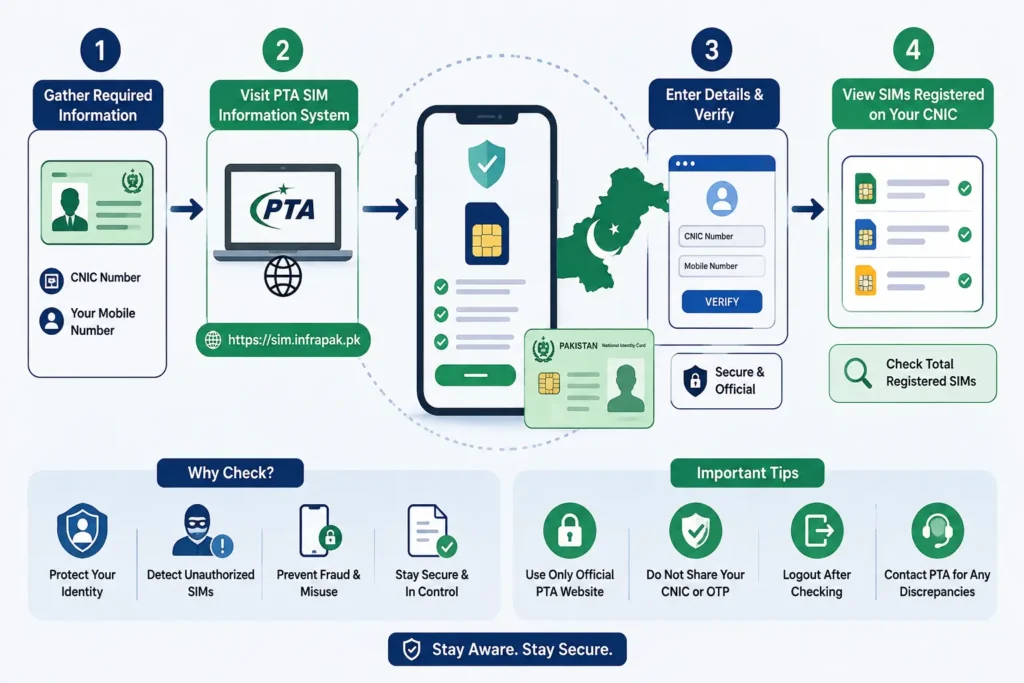
To check SIMs registered against your CNIC in Pakistan, open the official SIM Information System, enter your 13-digit CNIC, complete the verification, and review the total and network-wise SIM count. You can also check SIMs issued in your name through the 668 SMS method referenced in PTA guidance.
If you want to know how to check SIMs registered on your CNIC in Pakistan, you can use the official SIM Information System to check the total number of SIMs registered against your CNIC.
The official system lets you enter your CNIC and view the number of SIMs associated with it, including a network-wise breakdown.
This guide explains how the CNIC SIM check works, what information you can see, what to do if the number does not match your records, and why you should be careful with websites claiming to provide private SIM owner information.
How to Check SIMs Registered on Your CNIC
The simplest way to check SIM registrations associated with your CNIC is through the official SIM Information System.
Steps to check SIMs on your CNIC online
- Open the official SIM Information System.
- Select the CNIC option.
- Enter your 13-digit CNIC number.
- Complete the verification shown on the page.
- Submit the information.
- Review the SIM count displayed for the available mobile networks.
The official system is specifically designed to show the total number of SIMs registered against a CNIC. Its results can also show the number of SIMs associated with individual networks.
You can also use the PTA-referenced SMS method. PTA’s cyber-crime guidance advises consumers to periodically check the number of SIMs issued in their name by sending their CNIC number to 668 and to take action on illegally issued SIMs.
What Information Does a CNIC SIM Check Show?
A CNIC-based SIM check is primarily useful for answering three questions:
- How many SIMs are registered against my CNIC?
- Which mobile networks have registrations associated with my CNIC?
- Does the result match the SIMs I currently use or remember having?
The official SIM Information System displays a network-wise table with the number of SIMs and a total.
For example, the result may be presented in a format similar to:
| Network | Number of SIMs |
| Jazz | 1 |
| Telenor | 1 |
| Ufone | 0 |
| Zong | 1 |
| Total | 3 |
The exact result depends on the CNIC being checked.
What the result means
If you recognize all of the registrations, you may not need to take any further action.
If the total is higher than the number of SIMs you currently use, do not immediately assume that your CNIC has been misused. An old, unused, replaced, transferred, or otherwise forgotten connection may explain the difference.
If you still cannot explain the registration, contact the relevant mobile operator and ask about the appropriate verification or ownership-resolution process.
Can You Check the Actual SIM Numbers Through a CNIC?
This is an important distinction.
People searching for “how to check all SIM numbers on CNIC” or “check SIM number through CNIC” may expect the official system to display a complete list of mobile numbers.
The official SIM Information System is presented as a service for finding the total number of SIMs registered against a CNIC, with the result broken down by network. It is not presented as a public directory for retrieving another person’s private subscriber information.
So there is a difference between:
| What you want to know | Appropriate approach |
| How many SIMs are registered on your CNIC? | Use the official CNIC SIM check |
| Which networks have registrations? | Review the network-wise result |
| Why does the number of registrations seem incorrect? | Compare with old SIMs and contact the relevant operator |
| Someone else’s private subscriber details | Do not rely on unofficial databases |
This distinction is important because a SIM count is not the same thing as a public list of private mobile numbers.
How to Check SIMs Registered in Your Name
If you search for “how to check SIMs on my name”, the practical method is to check your CNIC rather than simply searching for your name.
A person’s name is not a reliable unique identifier because many people can have the same or similar names.
Your CNIC is the identity document used for this type of registration check.
To check SIMs registered in your name:
- Keep your CNIC available.
- Open the official SIM Information System.
- Enter your 13-digit CNIC.
- Complete the verification.
- Review the total and network-wise SIM count.
- Compare the result with the SIMs you currently use.
If you need a separate explanation of CNIC-related checks, you can also read our CNIC Number Check guide.
How to Check SIMs on an ID Card Online
You may also see searches such as “how to check SIMs on my ID card online.”
In Pakistan, the CNIC number printed on your identity card is the information used for this type of SIM registration check.
You do not need a separate public “ID card SIM database.”
Simply use your own CNIC number with the official SIM Information System and review the resulting SIM count.
What to Do If You Find an Unknown SIM on Your CNIC
An unexpected SIM registration does not automatically prove that someone has misused your CNIC.
First, compare the result with your previous connections.
You may have:
- stopped using an old SIM;
- replaced a lost or damaged SIM;
- changed your mobile number;
- transferred or closed a previous connection;
- forgotten about a SIM purchased some time ago.
If you still cannot explain the registration, contact the relevant mobile operator.
Step 1: Identify the network
Start by noting which network shows the unexpected registration.
If you need help understanding a network-related SIM check, see our Network SIM Check guide.
Step 2: Check your old SIM history
Think about SIMs you have previously owned or used.
Do not assume that every unfamiliar registration is fraudulent without first checking whether it could be an old connection.
Step 3: Contact the relevant mobile operator
If you still do not recognize the registration, contact the operator associated with it.
Ask what verification or ownership-resolution procedure applies to the registration.
Step 4: Ask about correction or closure
If the operator confirms that the registration should not remain associated with you, ask about the available process for blocking, closing, or correcting it.
Step 5: Keep your complaint details
Keep any complaint number, reference number, date, SMS confirmation, or other record provided by the operator.
If you need information about PTA-related verification or escalation, see our PTA SIM Verification guide.
PTA’s cyber-safety guidance specifically recommends periodically checking SIMs issued in your name and taking action to block illegally issued SIMs.
Is It Safe to Use SIM Database Websites?
You may find websites, apps, or social-media pages claiming to provide:
- SIM database checks;
- SIM owner details;
- CNIC-to-mobile-number searches;
- private subscriber information;
- complete SIM databases.
You should be cautious with these services.
A website claiming to have a large database does not establish that the information is accurate, current, authorized, or safe to use.
More importantly, you should avoid entering your CNIC, phone number, password, OTP, or other sensitive information into an unfamiliar service simply because it promises “complete SIM details.”
PTA’s National Telecom CERT advises users to protect confidential information and provides cybersecurity guidance for telecom users.
For your own SIM registration check, use the official SIM Information System or an appropriate telecom operator channel.
Can You Find a SIM Owner’s Name From a Mobile Number?
A different search intent is finding the owner of a mobile number.
A CNIC SIM check for your own identity should not be confused with trying to obtain another person’s private subscriber information from a phone number.
Be particularly careful with websites claiming that you can enter any mobile number and instantly obtain someone’s:
- full name;
- CNIC number;
- address;
- family information;
- private subscriber records.
Do not assume that such information is publicly available or that a website claiming to provide it is legitimate.
If you are researching a particular phone number, you can read our Reverse Number Lookup guide for information about that type of search.
SIM Verification vs SIM Ownership vs SIM Tracking
These terms are often mixed together, but they describe different things.
| Term | Meaning |
| SIM verification | Checking information associated with SIM registration |
| SIM ownership | Subscriber information associated with a mobile connection |
| SIM tracking | Tracking or locating a device or connection, which is different from checking registration |
A CNIC SIM check is a registration check. It should not be interpreted as a tool for obtaining another person’s live location.
If you want to understand the difference between registration checking and tracking, see our SIM Tracker guide.
Why Should You Check SIMs Registered on Your CNIC?
Checking your SIM registrations periodically can help you identify registrations that you no longer recognize.
It is particularly useful if:
- you have used several SIMs over the years;
- you have replaced old numbers;
- you have lost a SIM;
- you are unsure whether an old connection was closed;
- the number of registrations seems higher than expected.
The purpose is not to assume that every unexpected registration represents fraud. The purpose is to identify discrepancies and investigate them through the appropriate telecom channel.
Frequently Asked Questions
How can I check how many SIMs are registered on my CNIC?
Use the official SIM Information System, enter your 13-digit CNIC, complete the verification, and review the total SIM count and network-wise result.
How do I check SIMs on my name?
Check your own CNIC rather than searching by name. The CNIC-based SIM checking service is designed to show the SIM registrations associated with the entered CNIC.
Can I check SIMs registered on my ID card online?
Yes. Your CNIC number is the key information used for the online SIM registration check. Enter the 13-digit number from your CNIC into the official SIM Information System.
How do I check all SIM numbers on CNIC?
The official system is designed to show the total number of SIMs registered against a CNIC and the network-wise breakdown. It should not be treated as a public directory for obtaining another person’s private mobile-number information.
Can I check my CNIC SIM online?
Yes. The official SIM Information System provides an online CNIC-based SIM registration check.
What should I do if I find an unknown SIM on my CNIC?
First compare the result with old or unused SIMs you may have forgotten. If you still cannot identify the registration, contact the relevant mobile operator and ask about its verification or correction procedure.
Can I find the owner of a mobile number?
Do not assume that a public website can legitimately provide private subscriber information from a mobile number. If you have a legitimate reason to investigate a number, use an appropriate telecom or official channel.
Can a SIM be tracked using its number?
A CNIC SIM registration check and live location tracking are different things. Checking SIM registrations does not by itself provide a person’s live location.
Final Answer
If you want to check SIMs registered on your CNIC in Pakistan, use the official SIM Information System.
Enter your 13-digit CNIC, complete the verification, and review the total number of SIMs and the network-wise result.
If the result does not match the SIMs you recognize, first consider old or unused connections. If you still cannot explain an unfamiliar registration, contact the relevant mobile operator and ask about the appropriate verification or correction process.
The key distinction is simple:
A CNIC SIM check tells you about SIM registrations associated with your own identity. It should not be treated as a public tool for exposing another person’s private subscriber information.
Official Sources
- SIM Information System
- PTA National Telecom CERT
- PTA Cyber Crime Risks, Prevention and Legal Remedies guide