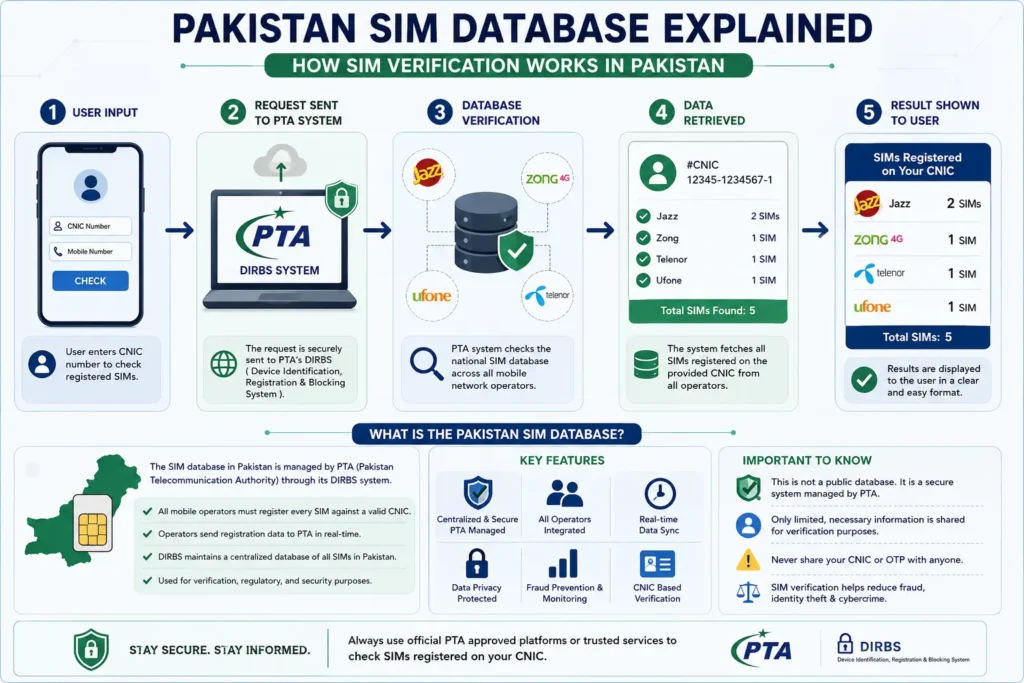
If you’ve searched for “sim database 2024” or “how to check my sim data online,” you’ve probably landed on outdated or confusing pages. Here’s the current, correct picture: Pakistan’s SIM database is a shared record maintained jointly by the Pakistan Telecommunication Authority (PTA) and NADRA, and in 2026 it’s easier than ever to check your own SIM data as long as you know which tool and method to trust.
This guide explains what the SIM database actually is, how verification works behind the scenes, and walks you through every legitimate way to check your SIM information online.
Whether you’re checking your own record for the first time, verifying a SIM before buying a used phone, or trying to confirm why a network sent you a warning SMS, this guide is written to answer all three cases in one place using only official, verifiable processes.
Quick Answer
- Pakistan’s SIM records are cross-verified between PTA (telecom regulator) and NADRA (CNIC database).
- Every CNIC holder can have a maximum of 5 active SIMs across all networks combined.
- The fastest official check is sending your CNIC number via SMS to 668.
- To report SIM misuse, send a blank SMS to 667.
- Every SIM in Pakistan requires biometric verification before activation.
What Is the Pakistan SIM Database?
The Pakistan SIM database is a digital record of every mobile connection issued in the country, linked directly to the subscriber’s CNIC. PTA first introduced the SIM Information System in 2009, after a rise in unregistered SIMs being linked to fraud and other misuse. Instead of each telecom operator holding an isolated customer list, PTA maintains a centralized system that cross-checks every SIM against NADRA’s identity records in real time.
This is why a Pakistan sim database search always ends up requiring your CNIC; it’s the single identifier that connects your identity to every SIM registered in your name, across every network (Jazz, Zong, Telenor, Ufone, and SCOM).
Before 2009, each operator kept its own subscriber list, and there was no easy way to see how many SIMs a single person had across different companies. Someone could hold ten Jazz connections and twelve Zong connections without any single system flagging it. The centralized database changed that by tying every SIM sale to a verified CNIC number, which is also how PTA is able to enforce a hard cap on total connections per person today.
It’s worth understanding that the “database” itself isn’t a single public website, it’s an internal PTA-NADRA system. The tools and SMS codes covered in this guide are the approved public interfaces into that system, not separate databases of their own. That distinction matters, because it’s also why unofficial apps claiming to have “extra” or “leaked” SIM data should always be treated with suspicion if there is no legitimate alternate source.
How Does SIM Verification Work in Pakistan?
SIM verification isn’t handled by one organization, it’s a three-way system.
The Role of NADRA
NADRA owns and manages the CNIC database. It confirms whether a CNIC is genuine, active, or expired, and supplies biometric data (fingerprints) used to confirm a subscriber’s identity at the time of sale.
The Role of PTA
PTA regulates telecom operators and enforces the rules including the 5-SIM-per-CNIC limit. It also runs periodic crackdowns; in 2026 alone, PTA has blocked over 1.8 million illegal SIMs, including those linked to deceased individuals and expired CNICs, as part of an ongoing verification drive.
The Role of Telecom Operators
Jazz, Zong, Telenor, and Ufone are required to verify every new SIM against NADRA’s database using a biometric fingerprint scan before activation, a rule that has been mandatory since August 2014. No SIM, new or replacement, can be issued without it.
What Happens When You Buy a New SIM
When you purchase a new connection, the retailer scans your fingerprint through a NADRA-linked biometric device at the point of sale. That scan is compared instantly against your CNIC record. If it matches, the SIM is activated within minutes; if it doesn’t, the sale is rejected on the spot. This same verification step applies to SIM replacements — so if you lose your phone and need a replacement SIM for your existing number, you’ll go through fingerprint verification again before the new SIM is activated.
Sim Online Database: How to Check Your SIM Data
Once you understand how the system works, checking your own sim online database is simple. There are three official routes:
1. Check by CNIC number Enter your 13-digit CNIC (without dashes) into an official checking tool to see every SIM registered under your name.
2. Check by mobile number If you only have a phone number and want to confirm details tied to it, a number-based lookup pulls the same underlying record.
3. Official SMS codes Send your CNIC number as a text to 668 for a free, instant SMS reply listing all SIMs registered against it.
You can run this exact CNIC-based check directly using our free tool at Sim Check by CNIC, which pulls the same verification format used above.
Simdata Check: Free Tools vs Third-Party Apps
Not every simdata check tool online is safe. Several third-party sites and apps ask for far more than a CNIC — some request photos of your ID card, your fingerprint, or app permissions with no clear reason. This is a serious safety concern, since scammers use fake “SIM checker” apps to harvest CNIC images for identity fraud.
Before using any third-party tool, check three things: does it ask for more than your CNIC or number, does it show a valid privacy policy, and does it avoid app-store permissions like contact or gallery access. A legitimate SIM detail lookup never needs anything beyond the number you’re checking.
For a safer starting point, you can always begin from our homepage, where every verified checking tool on this site is listed in one place.
Step-by-Step: How to Check All SIM Data Online
- Go to the checking tool of your choice (website or official SMS code).
- Enter your CNIC number without dashes, or the mobile number you want to check.
- Complete the captcha/verification step if prompted.
- Submit the request.
- Review the results you’ll see each SIM’s network, registration status, and count.
- If you find a SIM you don’t recognize, block it immediately through your operator or by reporting it to PTA.
If you specifically want to track ownership history or monitor a number over time rather than a one-time check, our SIM Tracker tool is built for that.
Checking SIM Details Network by Network
Each operator in Pakistan pulls from the same central database, but the request format differs slightly. Jazz, Zong, Telenor, and Ufone each have their own SMS shortcodes and self-service portals, though the underlying CNIC-linked record is identical across all of them.
Rather than checking each network separately, you can use our combined Network SIM Check page to check details across Jazz, Zong, Telenor, and Ufone from a single place.
Best SIM Information Apps in Pakistan (2026)
Search interest around “sim information app” has grown steadily, but the app-store landscape for this category is risky. Many apps ranking for these terms are unofficial, ad-heavy, and inconsistent with actual PTA records. As a rule, browser-based tools that talk directly to the CNIC record are more reliable than installable apps, since they don’t require storage or contact permissions and can’t retain your data on a device.
If your real goal is identifying who owns an unknown number rather than checking your own CNIC, a browser-based Reverse Number Lookup is the safer, app-free alternative.
Why Does SIM Verification Matter?
SIM verification isn’t just bureaucracy — it’s a security measure. Unregistered and cloned SIMs have historically been linked to fraud, harassment calls, and worse. PTA’s ongoing 2026 enforcement drive — which disconnected over 900,000 SIMs tied to deceased individuals’ CNICs and another 244,000 tied to cancelled or expired CNICs — shows how actively this system is maintained. Checking your own SIM count regularly ensures no one is using your identity without your knowledge.
For official verification status directly from the regulator’s own process, our PTA SIM Verification page walks through that specific check.
How Many SIMs Can You Check on Your CNIC?
Since the 5-SIM-per-CNIC limit applies across all networks combined, many people are surprised to find old, forgotten connections still active in their name. We’ve covered this specific question — including what to do if you’re over the limit — in a dedicated guide: How to Check How Many SIMs Are Registered on Your CNIC.
Common Mistakes People Make When Checking SIM Details
- Using unofficial apps that request unnecessary permissions or ID photos.
- Assuming a single “check” result is permanent — SIM status changes, so recheck periodically.
- Ignoring old, unused SIMs that count toward the 5-SIM limit.
- Sharing CNIC numbers on public forums or social media while asking others to “check” for them.
- Confusing a mobile number check with a CNIC check — they return different data.
Frequently Asked Questions
How can I check all SIM information registered on my CNIC?
Enter your CNIC number into an official CNIC-based checking tool, or send it via SMS to 668. Both return all sim information linked to your identity across every network.
What is the 668 SMS code used for?
It’s PTA’s official shortcode for checking how many SIMs are registered against a CNIC. You simply text your CNIC number to 668 and receive a reply listing them.
How many SIMs am I allowed to have on one CNIC?
A maximum of 5 SIMs, whether from one operator or spread across multiple networks.
Is it safe to check SIM details online?
es, through official tools or SMS codes that only require your CNIC or number. Avoid apps or sites that request ID photos, fingerprints, or unrelated permissions
Pakistan’s SIM database exists to protect subscribers, not just to enforce rules. Understanding how NADRA, PTA, and telecom operators work together makes it far easier to check your own data confidently and to spot when something’s wrong.